

GameDrive Geotagger
Your camera’s photos, placed on your drives.
Every photo from your pro camera gets the spot on the game drive where you took it, using the drives GameDrive recorded on your iPhone. It works from inside Adobe Lightroom Classic, and you never type a time.
Needs Adobe Lightroom Classic and drives recorded with GameDrive on iPhone. Applying locations needs a Safari Pass or GameDrive Forever, the same purchases as the iPhone app.
No manual time matching.
Your camera’s clock is never quite right. It drifts a few seconds a week, it’s still on home time, or a second body was set by someone else. Most geotagging tools hand that problem back to you. Geotagger solves it from one photo.
One photo of the sync code
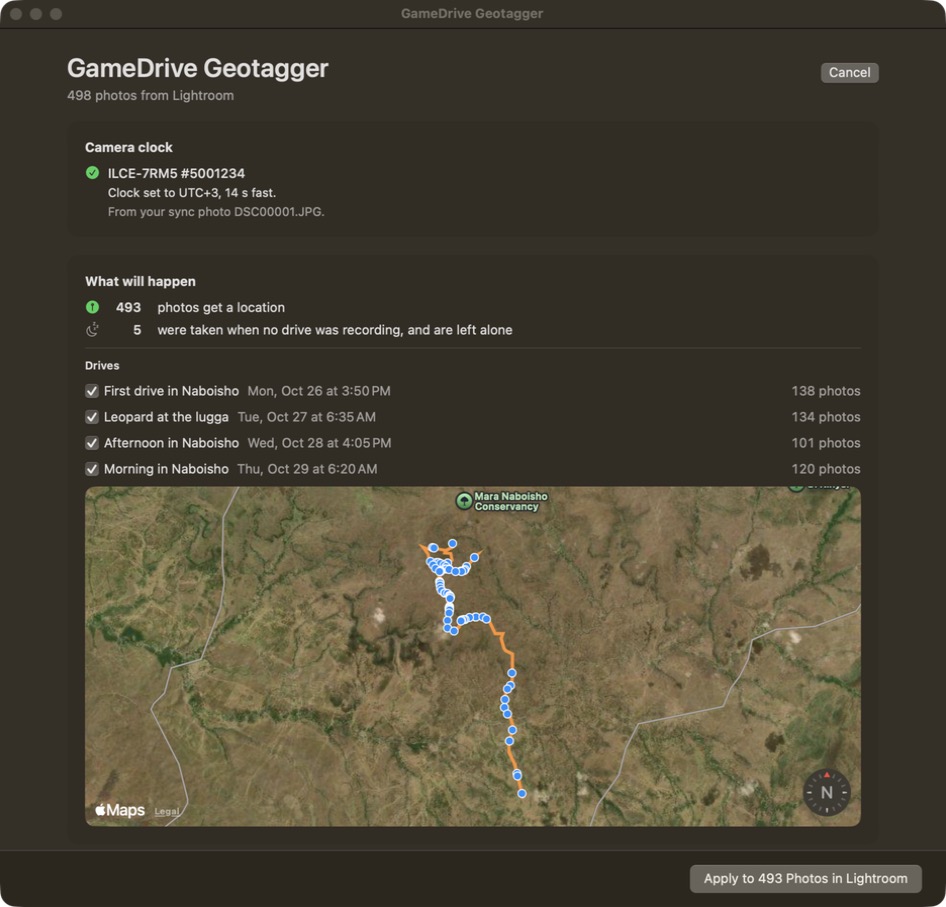
Before your first drive, photograph the sync code in GameDrive with your camera. Geotagger finds that photo by itself and reads the camera’s clock against the true time, to the second.
Every body, corrected separately
Shooting with two cameras? Each body gets its own correction, matched by serial number, so a fast clock on one doesn’t move the other’s photos.
New time zone, new sync photo
Crossing from Kenya into Tanzania, or reset the camera mid-trip? Take another photo of the sync code and Geotagger uses the right one for each stretch.
Nothing to select
Run it on a whole import. Geotagger finds the photos taken during your drives and leaves the rest alone.
From the vehicle to your catalogue.
- Record your drives with GameDrive on iPhone, as usual. Recording is free.
- Afterwards, AirDrop the trip to your Mac. Geotagger picks it up from Downloads.
- In Lightroom Classic, choose Library → Plug-in Extras → Geotag with GameDrive.
- Check the plan, drive by drive, then click Apply. Lightroom writes the locations into your catalogue.
Locations go straight into the Lightroom catalogue, so there are no sidecar files and no Read Metadata round trip. Remove GameDrive Locations takes off only what Geotagger added.
The Lightroom plug-in comes with the app: choose Install Lightroom Plug-in from the app’s menu, then restart Lightroom Classic.
Placed the way a game drive actually goes.
A GPS logger treats your trip as a line. A game drive isn’t one: you crawl, you stop for twenty minutes at a kill, you drive fast back to camp. Geotagger knows the difference.
On the move
Photos taken while the vehicle was moving go between the two nearest points on the route.
Stopped at a sighting
Photos taken while the car was stopped go where it stopped, not smeared along the road.
At camp
Photos taken at camp or between drives are left alone, so your lodge doesn’t end up on the map.
Your RAW files
Geotagger reads RAW, JPEG and HEIC files through macOS, so any body macOS can open works the same way. So far it has been tested on Sony ARW files from a real trip.
Tested on a real safari.
The first real run placed 780 Sony ARW files from a trip to Amboseli on the drives they were taken on.
One pass for iPhone and Mac.
Geotagger shows its plan for free. Applying locations needs the same purchase as the iPhone app. Buy on either device and restore on the other.
Your photos stay on your Mac.
No account, no advertising, no tracking. Geotagger reads your photos where they are and never uploads them. Its only network use is map tiles and the App Store.
New to GameDrive? Start with the iPhone app: it records the drives Geotagger needs.